
रिसाइकल बिन आपके Computer के लिये बहुत ही important होता है, जब आप कोई फाइल या फोल्डर कम्प्यूटर से हटाते हैं या Delete करते हैं, तो वह Recycle bin में पहुॅच जाता है और वहॉ सुरक्षित रहता है जब तक कि उसे वहॉ से हटाया ना जाये। लेकिन अक्सर लोग Computer से File Delete तो करते रहते हैं लेकिन Recycle bin को साफ नहीं करते हैं, जिससे उनके Computer पर अनावश्यक रूप से लोड रहता है, क्योंकि Recycle bin में पडी फाइलें भी आपकी HardDisk के स्पेस को यूज करती हैं, इसलिये रिसाइकल बिन को समय-समय पर चैक करके खाली करते रहना चाहिये। लेकिन अगर आप चाहते हैं कि आपकी Delete की हुई फाइल रिसाइकल बिन में जाये ही नहीं, सीधे डिलीट हो जाये तो नीचे दिये गये स्टैप फॉलो कीजिये –

पहला तरीका –
Recycle bin के Icon पर Right click कीजिये और Properties को सलेक्ट कीजिये।
Recycle bin के Icon पर Right click कीजिये और Properties को सलेक्ट कीजिये।
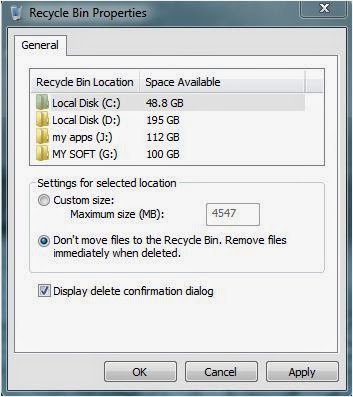
यहॉ Don’t move filed to Recycle bin. Remove files immediately when deleted. पर टिक कर दीजिये। इससे आपके द्वारा Delete की गयी कोई भी File Recycle bin में नहीं जायेगी और सीधे डिलीट हो जायेगी।
दूसरा तरीका –
File को सलैक्ट कीजिये और की-बोर्ड से Shift के साथ Delete बटन काे दबाइये File Recycle bin में नहीं जायेगी और सीधे डिलीट हो जायेगी।
delete files without going to recycle bin, delete files without recycle bin windows 7, permanently delete files without recycle bin, how to delete files without going to recycle bin, delete files without sending to recycle bin, how to delete files from recycle bin that won’t delete, delete without recycle bin mac


